অবস্থান-বরাদ্দ অপ্টিমাইজেশান
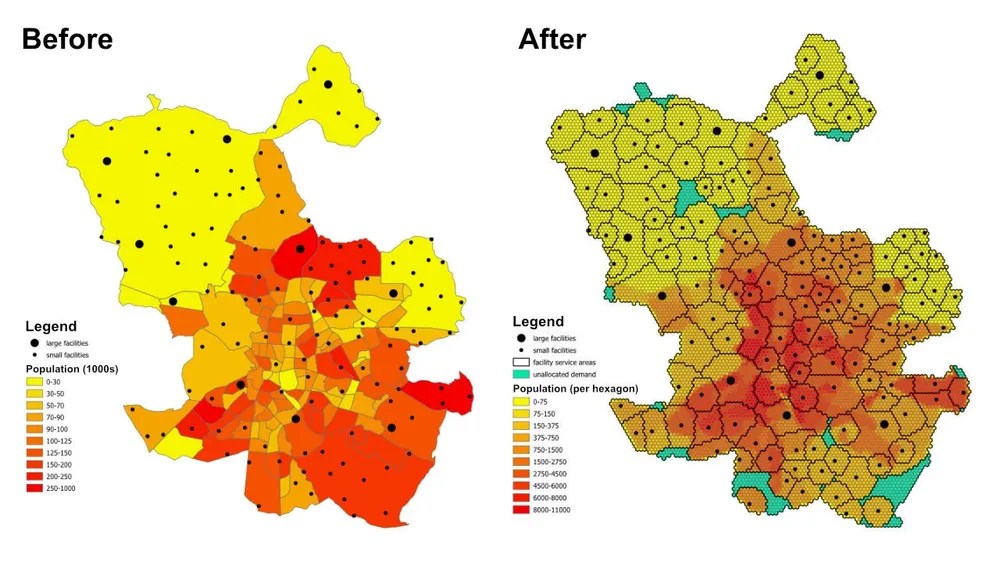
এই উদাহরণটি দেখায় কিভাবে আমরা ওপেন সোর্স পাইথন ব্যবহার করে একটি বড় অ্যাসাইনমেন্ট এবং লোকেশন-অ্যালোকেশন সমস্যার সাথে যোগাযোগ করি। ওয়ার্কফ্লো বেনামী ডেটা ব্যবহার করে এবং প্রদর্শন করে যে আমরা কীভাবে মডেল ইনপুট প্রস্তুত করি, মূল-গন্তব্য ম্যাট্রিক্স তৈরি করি, অপ্টিমাইজেশন সমাধান করি এবং আউটপুটগুলি জিওজেএসএন-এ আবার রপ্তানি করি যাতে সেগুলি GIS সফ্টওয়্যারে পর্যালোচনা করা যায়।
পরিকল্পনা প্রশ্নটি সহজ কিন্তু দরকারী: প্রতিটি আশেপাশের বা শহরতলির জনসংখ্যার পরিপ্রেক্ষিতে, প্রতিটি সুবিধার ক্ষমতা এবং প্রতিটি সুবিধা সর্বোচ্চ কত দূরত্ব পরিবেশন করতে পারে, পূর্ণ জনসংখ্যাকে পরিষেবা দেওয়ার জন্য কি যথেষ্ট সুবিধা রয়েছে এবং যদি না হয়, তাহলে বর্তমান সীমাবদ্ধতার অধীনে কোন এলাকাগুলি অনির্ধারিত থেকে যায়?
মডেল কি করে
এটি একটি অ্যাসাইনমেন্ট এবং অবস্থান-বরাদ্দ মডেল। প্রতিটি চাহিদার অবস্থান একটি ষড়ভুজ দ্বারা প্রতিনিধিত্ব করা হয়, প্রতিটি সুবিধা উপলব্ধ সরবরাহের প্রতিনিধিত্ব করে, এবং মডেলটি পরিষেবা-দূরত্ব এবং ক্ষমতার নিয়মগুলিকে সম্মান করার সময় প্রতিটি ষড়ভুজকে একটি একক সর্বোত্তম সুবিধা প্রদান করে। একই মডেলিং প্যাটার্নটি স্বাস্থ্যসেবা সুবিধা, স্কুল, ব্যাঙ্ক, খুচরা দোকান বা অন্যান্য পরিষেবা নেটওয়ার্কগুলির জন্য ব্যবহার করা যেতে পারে যেখানে আমাদের কভারেজ, পরিষেবার ক্ষেত্রগুলি এবং অ্যাক্সেসের ফাঁকগুলি বুঝতে হবে।
আউটপুট শুধুমাত্র অ্যাসাইনমেন্টের একটি টেবিল নয়। এটি পরিষেবা-এরিয়া এবং ট্রেড-এরিয়া স্তরগুলিতেও পরিণত করা যেতে পারে যা দেখায় যে কোন অবস্থানগুলি সম্ভাব্যভাবে প্রতিটি সুবিধা দ্বারা আচ্ছাদিত করা হয়েছে, কোন চাহিদার ক্ষেত্রগুলিকে একটি অনির্ধারিত ফলব্যাকে ঠেলে দেওয়া হয় এবং ক্ষমতা, দূরত্ব বা উদ্দেশ্যগুলি সামঞ্জস্য করা হলে ফলাফল কীভাবে পরিবর্তিত হয়৷
উদ্দেশ্যমূলক ফাংশন
এই উদাহরণের জন্য, উদ্দেশ্য হল প্রতিটি চাহিদা ষড়ভুজ থেকে তার নির্ধারিত সুবিধার মোট দূরত্ব কমিয়ে আনা। এটি বর্তমান অনুমানের অধীনে সবচেয়ে দক্ষ বরাদ্দ দেয়। ব্যবসায়িক প্রশ্ন পরিবর্তিত হলে একই কাঠামো একটি ভিন্ন উদ্দেশ্যমূলক ফাংশন দিয়ে পুনরায় চালানো যেতে পারে। উদাহরণস্বরূপ, আমরা দূরত্বের পরিবর্তে অপারেটিং খরচ কমিয়ে আনতে পারি, সরল-রেখার দূরত্বের পরিবর্তে ভ্রমণের সময় কমিয়ে আনতে পারি, অথবা চাহিদার ভারসাম্য বজায় রাখতে পারি যাতে উচ্চ-মূল্যের সুবিধাগুলি তাদের অপারেটিং প্রোফাইলকে ন্যায্যতা দেওয়ার জন্য যথেষ্ট পরিমাণ পায়।
মূল সীমাবদ্ধতা
- প্রতিটি সুবিধার সর্বোচ্চ পরিষেবা দূরত্ব রয়েছে, তাই সেই পরিসরের বাইরের চাহিদা এটিকে বরাদ্দ করা যাবে না।
- প্রতিটি সুবিধার সর্বনিম্ন এবং সর্বাধিক জনসংখ্যার সীমা রয়েছে, তাই এটির জন্য নির্ধারিত মোট চাহিদা অবশ্যই তার ক্ষমতা সীমার মধ্যে থাকতে হবে।
- প্রতিটি চাহিদা ষড়ভুজ একটি একক সুবিধা বরাদ্দ করা আবশ্যক.
- যদি একটি ষড়ভুজ কোনো বাস্তব সুবিধার জন্য বরাদ্দ না করা যায়, তাহলে এটি একটি ডামি
unassignedসুবিধার জন্য বরাদ্দ করা যেতে পারে যাতে মডেলটি সম্ভাব্য থাকে এবং কভারেজ ফাঁক দৃশ্যমান হয়। - উদাহরণটি দ্রুত প্রোটোটাইপিংয়ের জন্য ষড়ভুজ সেন্ট্রোয়েড এবং সুবিধাগুলির মধ্যে ইউক্লিডীয় দূরত্ব ব্যবহার করে, কিন্তু একই ওয়ার্কফ্লো যখন প্রয়োজনে বাস্তব ড্রাইভযোগ্য রুটে স্যুইচ করা যেতে পারে।
কর্মপ্রবাহ
কর্মপ্রবাহের তিনটি প্রধান পর্যায় রয়েছে:
- আগ্রহের ক্ষেত্রটিকে একটি ষড়ভুজ টেসেলেশনে রূপান্তর করুন এবং প্রতিটি ষড়ভুজের জন্য জনসংখ্যা বের করুন৷
- প্রতিটি চাহিদা ষড়ভুজ এবং প্রতিটি সুবিধার মধ্যে উৎপত্তি-গন্তব্য ম্যাট্রিক্স তৈরি করুন।
- অপ্টিমাইজেশান মডেলটি সমাধান করুন এবং ফলাফলগুলি জিওজেএসএন-এ রপ্তানি করুন যাতে সেগুলি QGIS, ArcGIS Pro, বা অন্যান্য ম্যাপিং সফ্টওয়্যারে পর্যালোচনা করা যায়৷
ইমপ্লিমেন্টেশন স্ট্যাকের মধ্যে ওপেন সোর্স পাইথন রয়েছে যার মধ্যে শ্যাপলি, pyproj, sqlite3, pyomo, CBC solver এবং GeoJSON আউটপুট রয়েছে। ডেটা-প্রস্তুতির প্যাটার্নটি ইচ্ছাকৃতভাবে মডুলার, যা চাহিদা স্তর প্রতিস্থাপন করা, সুবিধার সীমাবদ্ধতা পরিবর্তন করা, উদ্দেশ্য অদলবদল করা বা অতিরিক্ত ব্যবসায়িক নিয়মের সাথে মডেলটিকে প্রসারিত করা সহজ করে তোলে।
বাস্তবায়ন নোট- পিউএলপি মূলত পরীক্ষা করা হয়েছিল, কিন্তু এর পরিবর্তে পিওমো বেছে নেওয়া হয়েছিল কারণ এটি অনেক বড় মডেলগুলিকে আরও নির্ভরযোগ্যভাবে পরিচালনা করে।
- মডেলটি ওপেন-সোর্স সিবিসি সলভারের সাথে সমাধান করা হয়েছিল, এবং এই পদ্ধতিটি সেই সেটআপের সাথে এক ঘন্টারও কম সময়ে 50 মিলিয়নেরও বেশি সিদ্ধান্তের ভেরিয়েবলে স্কেল করেছে।
- এমনকি বৃহত্তর দৃষ্টান্তের জন্য, গুরুবি বিবেচনা করা যেতে পারে যেখানে লাইসেন্সিং এর অনুমতি দেয়।
- GeoJSON-এ বড় আউটপুট লিখতে মডেল নিজেই সমাধান করার চেয়ে বেশি সময় লাগতে পারে, তাই বৃহত্তর উত্পাদন চালানোর জন্য এটি একটি ডাটাবেসে সরাসরি লেখা আরও দক্ষ হতে পারে।
- এই ধরনের মডেলগুলি তৈরি করার একটি ব্যবহারিক উপায় হল সীমাবদ্ধতাগুলি পরীক্ষা করার সময় বড় ষড়ভুজ এবং দ্রুত ইউক্লিডীয় দূরত্ব দিয়ে শুরু করা, তারপরে মডেল আচরণ বৈধ হওয়ার পরে সূক্ষ্ম টেসেলেশন এবং আরও বাস্তবসম্মত রুট খরচে স্যুইচ করা।
- অতিরিক্ত সীমাবদ্ধতাগুলি ক্রমবর্ধমানভাবে যোগ করা যেতে পারে, তবে সেগুলি সাবধানে চালু করা উচিত কারণ প্রতিটি অতিরিক্ত ব্যবসায়িক নিয়ম মডেলটিকে অসম্ভাব্য করে তোলার ঝুঁকি বাড়ায়।
উদাহরণ সোর্স কোড
নীচের কোডটি এই পৃষ্ঠায় সরাসরি এন্ড-টু-এন্ড ওয়ার্কফ্লো দেখায়।
1. generate_hexagons.py
import json
import math
import os
import pyproj
from shapely.geometry import shape

# for converting the coordinates to and from geographic and projected coordinates
TRAN_4326_TO_3857 = pyproj.Transformer.from_crs("EPSG:4326", "EPSG:3857")
TRAN_3857_TO_4326 = pyproj.Transformer.from_crs("EPSG:3857", "EPSG:4326")

# the area of interest used for generating the hexagons
input_geojson_file = "input/area_of_interest.geojson"

# load the area of interest into a JSON object
with open(input_geojson_file) as json_file:
    geojson = json.load(json_file)

# the area of interest coordinates (note this is for a single-part / contiguous polygon)
geographic_coordinates = geojson["features"][0]["geometry"]["coordinates"]

# create an area of interest polygon using shapely
aoi = shape({"type": "Polygon", "coordinates": geographic_coordinates})

# get the geographic bounding box coordinates for the area of interest
(lng1, lat1, lng2, lat2) = aoi.bounds

# get the projected bounding box coordinates for the area of interest
[W, S] = TRAN_4326_TO_3857.transform(lat1, lng1)
[E, N] = TRAN_4326_TO_3857.transform(lat2, lng2)

# the area of interest height
aoi_height = N - S

# the area of interest width
aoi_width = E - W

# the length of the side of the hexagon
l = 200

# the length of the apothem of the hexagon
apo = l * math.sqrt(3) / 2

# distance from the mid-point of the hexagon side to the opposite side
d = 2 * apo

# the number of rows of hexagons
row_count = math.ceil(aoi_height / l / 1.5)

# add a row of hexagons if the hexagon tessallation does not fully cover the area of interest
if(row_count % 2 != 0 and row_count * l * 1.5 - l / 2 < aoi_height):
    row_count += 1

# the number of columns of hexagons
column_count = math.ceil(aoi_width / d) + 1

# the total height and width of the hexagons
total_height_of_hexagons = row_count * l * 1.5 if row_count % 2 == 0 else 1.5 * (row_count - 1) * l + l
total_width_of_hexagons = (column_count - 1) * d

# offsets to center the hexagon tessellation over the bounding box for the area of interest
x_offset = (total_width_of_hexagons - aoi_width) / 2
y_offset = (row_count * l * 3 / 2 - l / 2 - aoi_height - l) / 2

# create an empty feature collection for the hexagons
feature_collection = { "type": "FeatureCollection", "features": [] }

oid = 1

hexagon_count = 0

for i in range(0, column_count):
    for j in range(0, row_count):
        if(j % 2 == 0 or i < column_count - 1):
            x = W - x_offset + d * i if j % 2 == 0 else W - x_offset + apo + d * i
            y = S - y_offset + l * 1.5 * j

            coords = []

            for [lat, lng] in [
                TRAN_3857_TO_4326.transform(x, y + l),
                TRAN_3857_TO_4326.transform(x + apo, y + l / 2),
                TRAN_3857_TO_4326.transform(x + apo, y - l / 2),
                TRAN_3857_TO_4326.transform(x, y - l),
                TRAN_3857_TO_4326.transform(x - apo, y - l / 2),
                TRAN_3857_TO_4326.transform(x - apo, y + l / 2),
                TRAN_3857_TO_4326.transform(x, y + l)
            ]:
                coords.append([lng, lat])

            hexagon = shape({"type": "Polygon", "coordinates": [coords]})

            # check if the hexagon is within the area of interest
            if aoi.intersects(hexagon):
                hexagon_count += 1
                if(hexagon_count % 1000 == 0):
                    print('Generated {} hexagons'.format(hexagon_count))

                population = 0
                hexagon_names = []

                # open the geojson file with the population data
                with open("input/population_areas.geojson") as json_file:
                    geojson = json.load(json_file)

                    for feature in geojson["features"]:
                        polygon = shape(
                            {
                                "type": "Polygon",
                                "coordinates": feature["geometry"]["coordinates"]
                            }
                        )

                        # check if hexagon is within the polygon and derive the population for that intersected part of the hexagon
                        if hexagon.intersects(polygon):
                            if not feature["properties"]["Name"] in hexagon_names:
                                hexagon_names.append(feature["properties"]["Name"])

                            population += (
                                hexagon.intersection(polygon).area
                                / polygon.area
                                * feature["properties"]["Population"]
                            )

                hexagon_names.sort()

                f = {
                    "type": "Feature",
                    "properties": {
                        "id": oid,
                        "name": ', '.join(hexagon_names),
                        "population": population
                    },
                    "geometry": {
                            "type": "Polygon",
                            "coordinates": [coords]
                        }
                }

                # add the hexagon to the feature collection
                feature_collection['features'].append(f)

                oid += 1

print('Generated {} hexagons'.format(hexagon_count))

# output the feature collection to a geojson file
with open("output/hexagons.geojson", "w") as output_file:
    output_file.write(json.dumps(feature_collection))


# Play a sound when the script finishes (macOS)
for i in range(1, 2):
    os.system('afplay /System/Library/Sounds/Glass.aiff')

# Play a sound when the script finishes (Windows OS)
    # import time
    # import winsound

    # frequency = 1000
    # duration = 300

    # for i in range(1, 10):
    #     winsound.Beep(frequency, duration)
    #     time.sleep(0.1)
2. generate_origin_destination_matrix.py
import json
import math
import os
import pyproj
import sqlite3

def getDistance(x1,y1,x2,y2):
    distance = math.sqrt((x2-x1)**2+(y2-y1)**2)
    return int(distance)

def getHexagonCentroid(hexagon):
    coordinates = hexagon['geometry']['coordinates'][0]

    # remove the last pair of coordinates in the hexagon
    coordinates.pop()

    lat = sum(coords[1] for coords in coordinates) / 6
    lng = sum(coords[0] for coords in coordinates) / 6

    return lat, lng

# for converting the coordinates to and from geographic and projected coordinates
TRAN_4326_TO_3857 = pyproj.Transformer.from_crs("EPSG:4326", "EPSG:3857")
TRAN_3857_TO_4326 = pyproj.Transformer.from_crs("EPSG:3857", "EPSG:4326")

# create a sqlite database for the results
db = 'output/results.sqlite'

# delete the database if it already exists
if(os.path.exists(db)):
    os.remove(db)

# create a connection to the sqlite database
conn = sqlite3.connect(db)

# create cursors for the database connection
c1 = conn.cursor()
c2 = conn.cursor()

# create the facilities table
c1.execute('''
    CREATE TABLE facilities (
        facility_id                     INT,
        facility_x                      REAL,
        facility_y                      REAL,
        trade_area_distance_constraint  REAL,
        min_population_constraint       INT,
        max_population_constraint       INT
    );
''')

c1.execute('''
    CREATE TABLE od_matrix (
        facility_id INT,
        hexagon_id  INT,
        facility_x  REAL,
        facility_y  REAL,
        hexagon_x   REAL,
        hexagon_y   REAL,
        distance    INT,
        optimal     INT
    );
''')

# the geojson for the facilities
input_geojson_file = "input/facilities.geojson"

# load the area of interest into a JSON object
with open(input_geojson_file) as json_file:
    geojson = json.load(json_file)

    facilities = geojson['features']

    for facility in facilities:
        facility_id = facility['properties']['OID']
        trade_area_distance_constraint = facility['properties']['trade_area_dist_constraint']
        min_population_constraint = facility['properties']['min_population_constraint']
        max_population_constraint = facility['properties']['max_population_constraint']

        [lng, lat] = facility['geometry']['coordinates']
        [x, y] = TRAN_4326_TO_3857.transform(lat, lng)

        sql = '''
            INSERT INTO facilities (
                facility_id,
                facility_x,
                facility_y,
                trade_area_distance_constraint,
                min_population_constraint,
                max_population_constraint
            )
            VALUES ({},{},{},{},{},{});
        '''.format(facility_id, x, y, trade_area_distance_constraint, min_population_constraint, max_population_constraint)

        c1.execute(sql)

# create an empty feature collection for the hexagons
feature_collection = { "type": "FeatureCollection", "features": [] }

# the geojson for the hexagons
input_geojson_file = "output/hexagons.geojson"

# load the area of interest into a JSON object
with open(input_geojson_file) as json_file:
    geojson = json.load(json_file)

    hexagons = geojson['features']

    for i, hexagon in enumerate(hexagons):
        hexagon_id = hexagon['properties']['id']
        lat, lng = getHexagonCentroid(hexagon)
        [hexagon_x, hexagon_y] = TRAN_4326_TO_3857.transform(lat, lng)

        rows = c1.execute('''
            SELECT facility_id, facility_x, facility_y, trade_area_distance_constraint
            FROM facilities;
        ''').fetchall()

        for row in rows:
            facility_id, facility_x, facility_y, trade_area_distance_constraint = row
            distance = getDistance(hexagon_x, hexagon_y, facility_x, facility_y)

            if(distance > int(trade_area_distance_constraint)):
                distance = 100000

            sql = '''
                INSERT INTO od_matrix(facility_id, facility_x, facility_y, hexagon_id, hexagon_x, hexagon_y, distance)
                VALUES ({},{},{},{},{},{},{});
            '''.format(facility_id, facility_x, facility_y, hexagon_id, hexagon_x, hexagon_y, distance)

            c2.execute(sql)

            (hexagon_lat, hexagon_lng) = TRAN_3857_TO_4326.transform(hexagon_x, hexagon_y)
            (facility_lat, facility_lng) = TRAN_3857_TO_4326.transform(facility_x, facility_y)

            coords = [[facility_lng, facility_lat],[hexagon_lng, hexagon_lat]]

            if(distance <= trade_area_distance_constraint):
                f = {
                    "type": "Feature",
                    "properties": {},
                    "geometry": {
                            "type": "LineString",
                            "coordinates": coords
                        }
                }

                # add the hexagon to the feature collection
                feature_collection['features'].append(f)


        if((i+1) % 1000 == 0):
            print('Processed {} hexagons'.format(i+1))


conn.commit()
conn.close()

# output the feasible facility-hexagon pairs to geojson
with open("output/routes.geojson", "w") as output_file:
    output_file.write(json.dumps(feature_collection))

for i in range(1,2):
    os.system('afplay /System/Library/Sounds/Glass.aiff')
3. solve_the_model.py
from pyomo.environ import *
from pyomo.opt import SolverFactory
import datetime
import json
import os
import pyproj
import sqlite3

# for converting the coordinates to and from geographic and projected coordinates
TRAN_4326_TO_3857 = pyproj.Transformer.from_crs("EPSG:4326", "EPSG:3857")
TRAN_3857_TO_4326 = pyproj.Transformer.from_crs("EPSG:3857", "EPSG:4326")

# the input database created from the previous script
db = 'output/results.sqlite'

# create a database connection
conn = sqlite3.connect(db)

# create a cursor for the database connection
c = conn.cursor()

# the demand, supply, and cost matrices
Demand = {}
Supply = {}
Cost = {}

'''
    Supply['S0'] is for infeasible results, i.e. hexagons that do not
    have any facilities when the nearest facility is too far away,
    or when the population constraint for the facilities means the
    hexagon cannot be assigned to that facility
'''
# the population capacity constraint of the "unassigned" facility
Supply['S0'] = {}
Supply['S0']['min_pop'] = 0
Supply['S0']['max_pop'] = 1E10

sql = '''
    SELECT DISTINCT hexagon_id
    FROM od_matrix
    ORDER BY 1;
'''

# the assignment constraint, i.e. each hexagon can only be assigned to one facility
for row in c.execute(sql):
    hexagon_id = row[0]
    d = 'D{}'.format(hexagon_id)
    Demand[d] = 1

    # the infeasible case for each hexagon
    Cost[(d,'S0')] = 1E4

sql = '''
    SELECT DISTINCT facility_id, min_population_constraint, max_population_constraint
    FROM facilities
    ORDER BY 1;
'''

# the facility capacity constraint - cannot supply more hexagons than the facility has capacity for
for row in c.execute(sql):
    [facility_id, min_population_constraint, max_population_constraint] = row
    s = 'S{}'.format(facility_id)
    Supply[s] = {}
    Supply[s]['min_pop'] = min_population_constraint
    Supply[s]['max_pop'] = max_population_constraint

sql = '''
    SELECT facility_id, hexagon_id, distance
    FROM od_matrix;
'''

# creating the Cost matrix
for row in c.execute(sql):
    (facility_id, hexagon_id, distance) = row
    d = 'D{}'.format(hexagon_id)
    s = 'S{}'.format(facility_id)
    Cost[(d,s)] = distance

print('Building the model')

# creating the model
model = ConcreteModel()
model.dual = Suffix(direction=Suffix.IMPORT)

# Step 1: Define index sets
dem = list(Demand.keys())
sup = list(Supply.keys())

# Step 2: Define the decision variables
model.x = Var(dem, sup, domain=NonNegativeReals)

# Step 3: Define Objective
model.Cost = Objective(
    expr = sum([Cost[d,s]*model.x[d,s] for d in dem for s in sup]),
    sense = minimize
)

# Step 4: Constraints
model.sup = ConstraintList()
# each facility cannot supply more than its population capacity
for s in sup:
    model.sup.add(sum([model.x[d,s] for d in dem]) >= Supply[s]['min_pop'])
    model.sup.add(sum([model.x[d,s] for d in dem]) <= Supply[s]['max_pop'])

model.dmd = ConstraintList()
# each hexagon can only be assigned to one facility
for d in dem:
    model.dmd.add(sum([model.x[d,s] for s in sup]) == Demand[d])

'''
    There is no need to add a constraint for the service/trade area distances
    for the facilities. We are already handling this when we generate
    the origin destination matrix. If any hexagon falls outside of all
    facility trade areas, then it gets assigned to the "unassigned" facility.
'''

print('Solving the model')

# use the CBC solver and solve the model
results = SolverFactory('cbc').solve(model)

# for c in dem:
#     for s in sup:
#         print(c, s, model.x[c,s]())

# if the model solved correctly
if 'ok' == str(results.Solver.status):
    print("Objective Function = ", model.Cost())
    print('Outputting the results to GeoJSON') # note it would be faster to write the results directly to a database, e.g. Postgres / SQL Server

    # print("Results:")
    for s in sup:
        for d in dem:
            if model.x[d,s]() > 0:
                # print("From ", s," to ", d, ":", model.x[d,s]())
                facility_id = s.replace('S','')
                hexagon_id = d.replace('D','')
                c.execute('''
                    UPDATE od_matrix
                    SET optimal = 1
                    WHERE facility_id = {}
                        AND hexagon_id = {};
                '''.format(facility_id, hexagon_id))

    # create an empty feature collection for the results
    feature_collection = { "type": "FeatureCollection", "features": [] }

    rows = c.execute('''
            SELECT facility_id, hexagon_id, facility_x, facility_y, hexagon_x, hexagon_y, distance
            FROM od_matrix
            WHERE optimal = 1;
        ''')

    for row in rows:
        (facility_id, hexagon_id, facility_x, facility_y, hexagon_x, hexagon_y, distance) = row
        (hexagon_lat, hexagon_lng) = TRAN_3857_TO_4326.transform(hexagon_x, hexagon_y)
        (facility_lat, facility_lng) = TRAN_3857_TO_4326.transform(facility_x, facility_y)

        coords = [[facility_lng, facility_lat],[hexagon_lng, hexagon_lat]]

        f = {
                "type": "Feature",
                "properties": {},
                "geometry": {
                        "type": "LineString",
                        "coordinates": coords
                    }
            }

        # add the route to the feature collection
        feature_collection['features'].append(f)

    # output the optimally assigned pairs to geojson
    with open("output/optimal_results.geojson", "w") as output_file:
        output_file.write(json.dumps(feature_collection))

    # update the hexagons
    with open('output/hexagons.geojson') as json_file:
        geojson = json.load(json_file)
        hexagons = geojson['features']

        for hexagon in hexagons:
            facility_id = -1
            hexagon_id = hexagon['properties']['id']

            sql = '''
                SELECT facility_id
                FROM od_matrix
                WHERE hexagon_id = {}
                    AND optimal = 1;
            '''.format(hexagon_id)

            row = c.execute(sql).fetchone()

            if row:
                facility_id = row[0]

            hexagon['properties']['facility_id'] = facility_id

        # load the area of interest into a JSON object
        with open("output/hexagon_results.geojson", "w") as output_file:
            output_file.write(json.dumps(geojson))

else:
    print("No Feasible Solution Found")

finish_time = datetime.datetime.now()
# print('demand nodes = {} and supply nodes = {} | time = {}'.format(no_of_demand_nodes, no_of_supply_nodes, finish_time-start_time))

conn.commit()
conn.close()

for i in range(1,2):
    os.system('afplay /System/Library/Sounds/Glass.aiff')