ラスター処理ツール
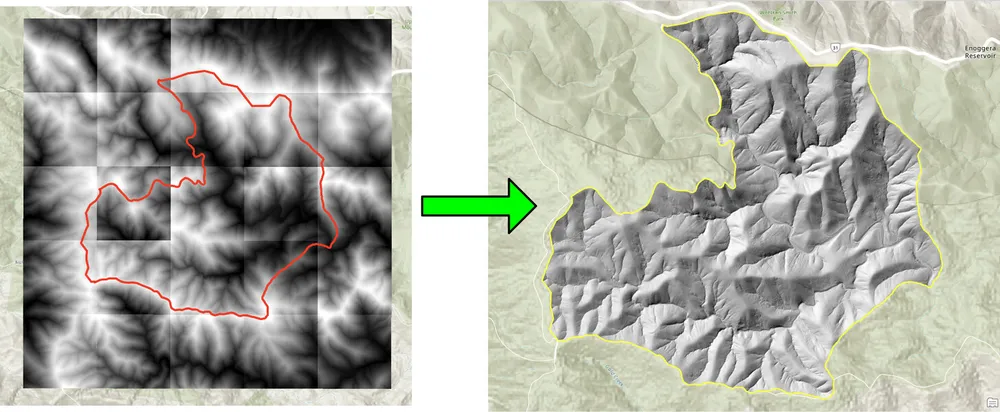
この例では、KDRM がラスター ワークフローを自動化するために作成したラスターおよび画像処理ツールの一部を示します。これらのツールは、対象領域へのラスターのバッチ クリッピング、必要な出力解像度へのラスターのリサンプリング、後の分析のためのラスター入力の準備、大規模な配信ワークフローからの低速で反復的な手動処理ステップの削除などのタスクに役立ちます。
以下の例は、オープンソースの Python パッケージのみに焦点を当てています。実際には、このようなツールは、クライアント環境やワークフローの操作方法に応じて、スタンドアロン スクリプトとして実行したり、スケジュールされた処理ジョブとして実行したり、ArcGIS Pro や QGIS の広範なデスクトップ ワークフロー内に埋め込んだりすることができます。
これらのツールの用途
- DEM、DTM、およびその他のラスターを対象領域にバッチ クリッピングします。
- 後の計算とモデリングのためにセル サイズを揃えるためにラスターをリサンプリングします。
- 下流解析前のラスター入力のフィルタリングと検証。
- 手作業でなければ何時間もかかるラスター処理ステップを自動化します。
- デスクトップ、サーバー、またはコマンドライン環境で実行できる反復可能なラスター処理パイプラインを構築します。
このようなツールを構築する理由
パフォーマンス、再現性、移植性が重要であるため、ラスターを大量に使用するプロジェクト向けにカスタム オートメーションを定期的に構築しています。場合によっては、ArcGIS に依存せずに純粋なオープンソース ワークフローとして実行することが要件となる場合があります。他の場合には、アナリストが使い慣れたデスクトップ環境内でプロセスを実行できるように、同じロジックを ArcGIS Pro または QGIS ワークフロー内に配置する必要があります。基本的なアプローチは同じです。繰り返しの部分を自動化し、ロジックを透過的に保ち、ワークフローの再実行とサポートを容易にします。
以下のクリッピング例は、従来のデスクトップ手法によるラスターのバッチ クリッピングが遅すぎるワークフロー用に作成されました。オープンソースの Python パッケージを使用してプロセスを書き直すことで、ワークフローが劇的に高速化され、大規模なラスター コレクションにとってより実用的になりました。リサンプリングの例も同様の理由で構築されました。大きなラスター データセットをより細かい出力セル サイズに調整して、後でラスター計算を必要な解像度で実行できるようにする必要がありました。
例 1. オープンソース Python を使用したラスターのバッチ クリッピング
import json
import numpy as np
import os
import rasterio
import shutil

from rasterio.mask import mask
from shapely.geometry import shape
# the input and output directories for the rasters
input_directory = "input"
output_directory = "output"

# delete and recreate the output directory
if(os.path.exists(output_directory)):
    shutil.rmtree(output_directory)

os.makedirs(output_directory)

feature_collection = dict()

with open('national_park.geojson', 'r') as f:
    feature_collection = json.load(f)
area_of_interest = feature_collection['features'][0]['geometry']
clip_area = shape(area_of_interest)

for file in os.listdir(input_directory):
    # filter by tif files and only files with 2019 in the name
    if file.endswith('.tif') and '2019' in file:
        print(file)

        input_raster = os.path.join(input_directory, file)
        output_raster=os.path.join(output_directory, file)
        with rasterio.open(input_raster) as src:
            try:
                out_image, out_transform = mask(src, [clip_area], crop=True)

                # Set all nodata values to -99999
                out_image[out_image == src.nodata] = -99999
                raster_intersected = not np.all(out_image == -99999)
                # Check if the clip area intersects the raster and only save the raster if the clip area intersects with it
                if raster_intersected:
                    out_meta = src.meta.copy()
                    out_meta.update(
                        {
                            "driver": "GTiff",
                            "height": out_image.shape[1],
                            "width": out_image.shape[2],
                            "transform": out_transform,
                        }
                    )
                    with rasterio.open(output_raster, "w", **out_meta) as dest:
                        dest.write(out_image)

            except Exception as err:
                if ('Input shapes do not overlap raster' not in str(err)):
                    print('### Error with {} ###'.format(input_raster))
                    print(err)
                pass
例 2. オープンソース Python を使用したラスターのリサンプリング
import os
from osgeo import gdal

import numpy as np
import os

# the input and output directories
input_directory = 'input/DTM'
output_directory = 'output/DTM'

if not os.path.exists(output_directory):
    os.makedirs(output_directory)
for root, dirs, files in os.walk(input_directory):
    for file in files:
        if(file.endswith('.tif')):
            input_file = os.path.join(root, file)
            output_file = os.path.join(output_directory, file)

            print(file)

            # Read the input raster file
            raster = gdal.Open(input_file)
            # Get the original cell size
            cell_size = raster.GetGeoTransform()[1]
            # print('Original cell size: {}'.format(cell_size))

            # Calculate the number of cells for the output
            num_cells = int(np.ceil(cell_size / 0.5))
            # Create the output raster file
            driver = gdal.GetDriverByName('GTiff')
            out_raster = driver.Create(output_file, raster.RasterXSize * num_cells,
                                    raster.RasterYSize * num_cells, 1,
                                    gdal.GDT_Float32)

            # Set the output raster's projection
            out_raster.SetProjection(raster.GetProjection())
            # Set the output raster's geotransform
            out_raster_geo = list(raster.GetGeoTransform())
            out_raster_geo[1] = 0.5
            out_raster_geo[5] = -0.5
            out_raster.SetGeoTransform(out_raster_geo)

            nodata = -99999

            for i in range(1, out_raster.RasterCount + 1):
                # set the nodata value of the band
                out_raster.GetRasterBand(i).SetNoDataValue(nodata)
            # Copy the input raster data to the output raster
            gdal.ReprojectImage(raster, out_raster,
                                raster.GetProjection(),
                                out_raster.GetProjection(),
                                gdal.GRA_NearestNeighbour)

            # Close the files
            out_raster = None
            raster = None
配送オプション
上記の例は意図的に単純化していますが、ロギング、検証、並列処理、メタデータ チェック、パッケージ化、より広範な GIS 配信パイプラインへの統合を使用して、同じアプローチを大規模な運用ワークフローに拡張できます。クライアントの要件に応じて、これらのツールをスタンドアロン スクリプトとして、ArcGIS Pro または QGIS 用のデスクトップ統合ツールとして、またはより広範な空間データ プラットフォームの一部として本番化されたサービスとして提供できます。