래스터 처리 도구
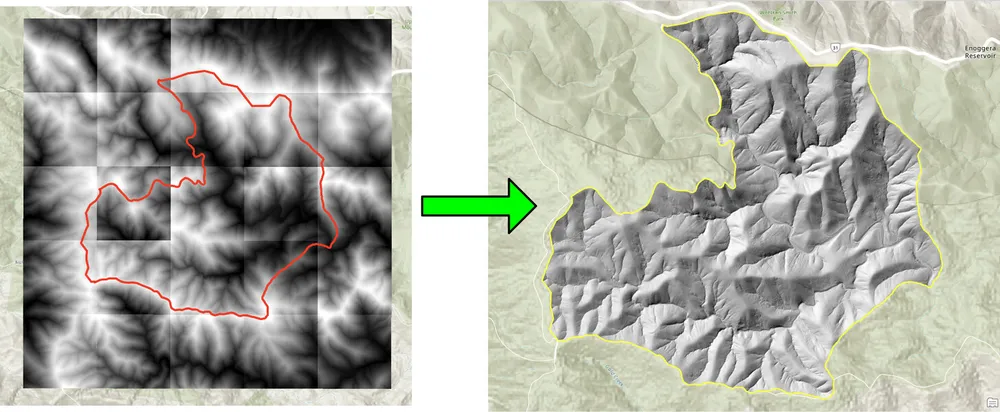
이 예에서는 KDRM이 래스터 작업 흐름을 자동화하기 위해 만든 래스터 및 이미지 처리 도구 중 일부를 보여줍니다. 이러한 도구는 래스터를 관심 영역으로 일괄 클리핑하고, 래스터를 필요한 출력 해상도로 리샘플링하고, 향후 분석을 위해 래스터 입력을 준비하고, 대규모 전달 워크플로우에서 느리고 반복적인 수동 처리 단계를 제거하는 등의 작업에 유용합니다.
아래 예제는 오픈 소스 Python 패키지에만 중점을 둡니다. 실제로 이와 같은 도구는 클라이언트 환경과 워크플로 운영 방식에 따라 독립 실행형 스크립트, 예약된 처리 작업으로 실행되거나 ArcGIS Pro 또는 QGIS의 더 넓은 데스크톱 워크플로에 내장될 수 있습니다.
이 도구의 용도
- DEM, DTM 및 기타 래스터를 관심 영역으로 일괄 클리핑합니다.
- 차후 계산 및 모델링을 위해 셀 크기를 정렬하기 위해 래스터를 리샘플링합니다.
- 다운스트림 분석 전에 래스터 입력을 필터링하고 검증합니다.
- 수 시간씩 소요되는 래스터 처리 단계를 자동화합니다.
- 데스크톱, 서버 또는 명령줄 환경에서 실행할 수 있는 반복 가능한 래스터 처리 파이프라인을 구축합니다.
우리가 이런 도구를 만드는 이유
성능, 반복성 및 이식성이 중요하기 때문에 우리는 래스터가 많은 프로젝트를 위한 맞춤형 자동화를 정기적으로 구축합니다. 때로는 ArcGIS 종속성 없이 순수한 오픈 소스 워크플로로 실행해야 하는 경우도 있습니다. 다른 경우에는 분석가가 익숙한 데스크탑 환경 내에서 프로세스를 실행할 수 있도록 동일한 로직이 ArcGIS Pro 또는 QGIS 작업흐름 내부에 있어야 합니다. 기본 접근 방식은 동일합니다. 즉, 반복적인 부분을 자동화하고 논리를 투명하게 유지하며 워크플로를 더 쉽게 다시 실행하고 지원할 수 있도록 만듭니다.
아래의 클리핑 예는 기존 데스크톱 접근 방식을 사용한 래스터 일괄 클리핑이 너무 느린 작업 흐름을 위해 만들어졌습니다. 오픈 소스 Python 패키지로 프로세스를 다시 작성하면 대규모 래스터 컬렉션에 대한 워크플로가 훨씬 더 빠르고 실용적이게 되었습니다. 리샘플링 예제도 비슷한 이유로 만들어졌습니다. 대규모 래스터 데이터세트를 더 미세한 출력 셀 크기에 맞춰 정렬해야 나중에 래스터 계산이 필요한 해상도에서 실행될 수 있습니다.
예시 1. 오픈 소스 Python을 사용한 일괄 클리핑 래스터
import json
import numpy as np
import os
import rasterio
import shutil

from rasterio.mask import mask
from shapely.geometry import shape
# the input and output directories for the rasters
input_directory = "input"
output_directory = "output"

# delete and recreate the output directory
if(os.path.exists(output_directory)):
    shutil.rmtree(output_directory)

os.makedirs(output_directory)

feature_collection = dict()

with open('national_park.geojson', 'r') as f:
    feature_collection = json.load(f)
area_of_interest = feature_collection['features'][0]['geometry']
clip_area = shape(area_of_interest)

for file in os.listdir(input_directory):
    # filter by tif files and only files with 2019 in the name
    if file.endswith('.tif') and '2019' in file:
        print(file)

        input_raster = os.path.join(input_directory, file)
        output_raster=os.path.join(output_directory, file)
        with rasterio.open(input_raster) as src:
            try:
                out_image, out_transform = mask(src, [clip_area], crop=True)

                # Set all nodata values to -99999
                out_image[out_image == src.nodata] = -99999
                raster_intersected = not np.all(out_image == -99999)
                # Check if the clip area intersects the raster and only save the raster if the clip area intersects with it
                if raster_intersected:
                    out_meta = src.meta.copy()
                    out_meta.update(
                        {
                            "driver": "GTiff",
                            "height": out_image.shape[1],
                            "width": out_image.shape[2],
                            "transform": out_transform,
                        }
                    )
                    with rasterio.open(output_raster, "w", **out_meta) as dest:
                        dest.write(out_image)

            except Exception as err:
                if ('Input shapes do not overlap raster' not in str(err)):
                    print('### Error with {} ###'.format(input_raster))
                    print(err)
                pass
예시 2. 오픈 소스 Python을 사용하여 래스터 리샘플링
import os
from osgeo import gdal

import numpy as np
import os

# the input and output directories
input_directory = 'input/DTM'
output_directory = 'output/DTM'

if not os.path.exists(output_directory):
    os.makedirs(output_directory)
for root, dirs, files in os.walk(input_directory):
    for file in files:
        if(file.endswith('.tif')):
            input_file = os.path.join(root, file)
            output_file = os.path.join(output_directory, file)

            print(file)

            # Read the input raster file
            raster = gdal.Open(input_file)
            # Get the original cell size
            cell_size = raster.GetGeoTransform()[1]
            # print('Original cell size: {}'.format(cell_size))

            # Calculate the number of cells for the output
            num_cells = int(np.ceil(cell_size / 0.5))
            # Create the output raster file
            driver = gdal.GetDriverByName('GTiff')
            out_raster = driver.Create(output_file, raster.RasterXSize * num_cells,
                                    raster.RasterYSize * num_cells, 1,
                                    gdal.GDT_Float32)

            # Set the output raster's projection
            out_raster.SetProjection(raster.GetProjection())
            # Set the output raster's geotransform
            out_raster_geo = list(raster.GetGeoTransform())
            out_raster_geo[1] = 0.5
            out_raster_geo[5] = -0.5
            out_raster.SetGeoTransform(out_raster_geo)

            nodata = -99999

            for i in range(1, out_raster.RasterCount + 1):
                # set the nodata value of the band
                out_raster.GetRasterBand(i).SetNoDataValue(nodata)
            # Copy the input raster data to the output raster
            gdal.ReprojectImage(raster, out_raster,
                                raster.GetProjection(),
                                out_raster.GetProjection(),
                                gdal.GRA_NearestNeighbour)

            # Close the files
            out_raster = None
            raster = None
배송 옵션
위의 예는 의도적으로 단순하지만 로깅, 검증, 병렬 처리, 메타데이터 확인, 패키징 및 더 넓은 GIS 제공 파이프라인으로의 통합을 통해 더 큰 생산 워크플로에 대해 동일한 접근 방식을 확장할 수 있습니다. 클라이언트 요구 사항에 따라 이러한 도구를 독립 실행형 스크립트, ArcGIS Pro 또는 QGIS용 데스크톱 통합 도구 또는 더 넓은 공간 데이터 플랫폼의 일부로 생산화된 서비스로 제공할 수 있습니다.