रास्टर प्रक्रिया साधने
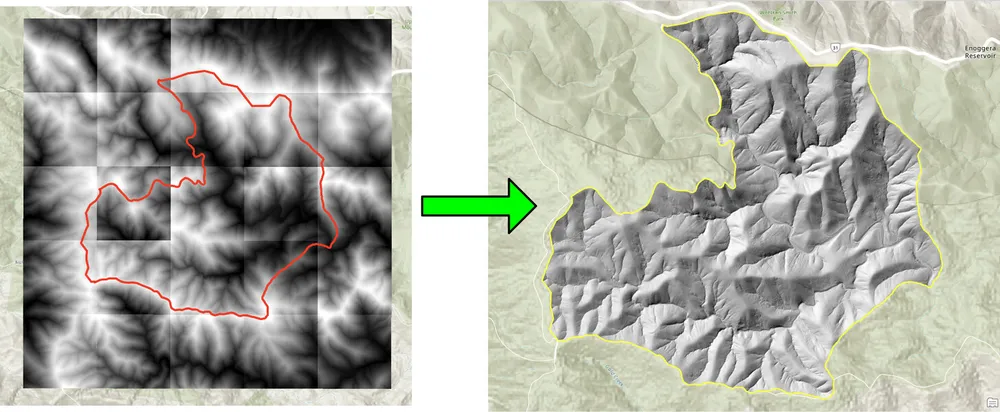
हे उदाहरण रास्टर वर्कफ्लो स्वयंचलित करण्यासाठी KDRM ने तयार केलेली काही रास्टर आणि इमेज-प्रोसेसिंग टूल्स दाखवते. ही साधने आवडीच्या क्षेत्रासाठी बॅच क्लिपिंग रास्टर्स, आवश्यक आउटपुट रिझोल्यूशनसाठी रास्टर्सचे पुन्हा नमुने तयार करणे, नंतरच्या विश्लेषणासाठी रास्टर इनपुट तयार करणे आणि मोठ्या वितरण वर्कफ्लोमधून हळूवार पुनरावृत्ती होणारी मॅन्युअल प्रक्रिया पायऱ्या काढून टाकणे यासारख्या कामांसाठी उपयुक्त आहेत.
खालील उदाहरणे फक्त ओपन-सोर्स पायथन पॅकेजेसवर लक्ष केंद्रित करतात. प्रॅक्टिसमध्ये, क्लायंट वातावरणावर आणि वर्कफ्लोला कसे ऑपरेट करणे आवश्यक आहे यावर अवलंबून, यासारखी साधने स्टँडअलोन स्क्रिप्ट्स, शेड्यूल्ड प्रोसेसिंग जॉब्स किंवा ArcGIS Pro किंवा QGIS मधील विस्तृत डेस्कटॉप वर्कफ्लोमध्ये एम्बेड केली जाऊ शकतात.
ही साधने कशासाठी वापरली जातात
- बॅच क्लिपिंग डीईएम, डीटीएम आणि इतर रास्टर स्वारस्य असलेल्या क्षेत्रासाठी.
- नंतरची गणना आणि मॉडेलिंगसाठी सेल आकार संरेखित करण्यासाठी रास्टर्सचे पुनर्नमुने करणे.
- डाउनस्ट्रीम विश्लेषणापूर्वी रास्टर इनपुट फिल्टर करणे आणि प्रमाणित करणे.
- स्वयंचलित रास्टर प्रक्रिया चरण जे अन्यथा मॅन्युअल कामासाठी तास घेतील.
- पुनरावृत्ती करण्यायोग्य रास्टर-प्रोसेसिंग पाइपलाइन तयार करणे ज्या डेस्कटॉप, सर्व्हर किंवा कमांड-लाइन वातावरणात चालवल्या जाऊ शकतात.
आपण अशी साधने का बनवतो
आम्ही रास्टर-हेवी प्रोजेक्टसाठी नियमितपणे कस्टम ऑटोमेशन तयार करतो कारण कामगिरी, पुनरावृत्ती आणि पोर्टेबिलिटी महत्त्वाची असते. कधीकधी ArcGIS अवलंबित्वाशिवाय शुद्ध मुक्त-स्रोत वर्कफ्लो म्हणून चालवण्याची आवश्यकता असते. इतर प्रकरणांमध्ये समान तर्कशास्त्र ArcGIS Pro किंवा QGIS वर्कफ्लोमध्ये बसणे आवश्यक आहे जेणेकरून विश्लेषक परिचित डेस्कटॉप वातावरणात प्रक्रिया चालवू शकतील. अंतर्निहित दृष्टीकोन समान आहे: पुनरावृत्ती होणारे भाग स्वयंचलित करा, तर्क पारदर्शक ठेवा आणि कार्यप्रवाह पुन्हा चालवणे आणि समर्थन करणे सोपे करा.
खालील क्लिपिंग उदाहरण वर्कफ्लोसाठी तयार केले गेले होते जेथे पारंपारिक डेस्कटॉप दृष्टिकोन असलेले बॅच क्लिपिंग रास्टर खूप हळू होते. ओपन-सोर्स पायथन पॅकेजेससह प्रक्रिया पुन्हा लिहिल्याने मोठ्या रास्टर संग्रहांसाठी वर्कफ्लो नाटकीयरित्या जलद आणि अधिक व्यावहारिक बनला. रिसॅम्पलिंगचे उदाहरण अशाच कारणासाठी तयार केले गेले होते, जेथे मोठ्या रास्टर डेटासेटला बारीक आउटपुट सेल आकारात संरेखित करणे आवश्यक आहे जेणेकरून नंतर रास्टर गणना आवश्यक रिझोल्यूशनवर चालू शकेल.
उदाहरण 1. ओपन-सोर्स पायथनसह बॅच क्लिपिंग रास्टर
import json
import numpy as np
import os
import rasterio
import shutil

from rasterio.mask import mask
from shapely.geometry import shape
# the input and output directories for the rasters
input_directory = "input"
output_directory = "output"

# delete and recreate the output directory
if(os.path.exists(output_directory)):
    shutil.rmtree(output_directory)

os.makedirs(output_directory)

feature_collection = dict()

with open('national_park.geojson', 'r') as f:
    feature_collection = json.load(f)
area_of_interest = feature_collection['features'][0]['geometry']
clip_area = shape(area_of_interest)

for file in os.listdir(input_directory):
    # filter by tif files and only files with 2019 in the name
    if file.endswith('.tif') and '2019' in file:
        print(file)

        input_raster = os.path.join(input_directory, file)
        output_raster=os.path.join(output_directory, file)
        with rasterio.open(input_raster) as src:
            try:
                out_image, out_transform = mask(src, [clip_area], crop=True)

                # Set all nodata values to -99999
                out_image[out_image == src.nodata] = -99999
                raster_intersected = not np.all(out_image == -99999)
                # Check if the clip area intersects the raster and only save the raster if the clip area intersects with it
                if raster_intersected:
                    out_meta = src.meta.copy()
                    out_meta.update(
                        {
                            "driver": "GTiff",
                            "height": out_image.shape[1],
                            "width": out_image.shape[2],
                            "transform": out_transform,
                        }
                    )
                    with rasterio.open(output_raster, "w", **out_meta) as dest:
                        dest.write(out_image)

            except Exception as err:
                if ('Input shapes do not overlap raster' not in str(err)):
                    print('### Error with {} ###'.format(input_raster))
                    print(err)
                pass
उदाहरण 2. ओपन-सोर्स पायथनसह रास्टर्सचे पुनर्नमुने करणे
import os
from osgeo import gdal

import numpy as np
import os

# the input and output directories
input_directory = 'input/DTM'
output_directory = 'output/DTM'

if not os.path.exists(output_directory):
    os.makedirs(output_directory)
for root, dirs, files in os.walk(input_directory):
    for file in files:
        if(file.endswith('.tif')):
            input_file = os.path.join(root, file)
            output_file = os.path.join(output_directory, file)

            print(file)

            # Read the input raster file
            raster = gdal.Open(input_file)
            # Get the original cell size
            cell_size = raster.GetGeoTransform()[1]
            # print('Original cell size: {}'.format(cell_size))

            # Calculate the number of cells for the output
            num_cells = int(np.ceil(cell_size / 0.5))
            # Create the output raster file
            driver = gdal.GetDriverByName('GTiff')
            out_raster = driver.Create(output_file, raster.RasterXSize * num_cells,
                                    raster.RasterYSize * num_cells, 1,
                                    gdal.GDT_Float32)

            # Set the output raster's projection
            out_raster.SetProjection(raster.GetProjection())
            # Set the output raster's geotransform
            out_raster_geo = list(raster.GetGeoTransform())
            out_raster_geo[1] = 0.5
            out_raster_geo[5] = -0.5
            out_raster.SetGeoTransform(out_raster_geo)

            nodata = -99999

            for i in range(1, out_raster.RasterCount + 1):
                # set the nodata value of the band
                out_raster.GetRasterBand(i).SetNoDataValue(nodata)
            # Copy the input raster data to the output raster
            gdal.ReprojectImage(raster, out_raster,
                                raster.GetProjection(),
                                out_raster.GetProjection(),
                                gdal.GRA_NearestNeighbour)

            # Close the files
            out_raster = None
            raster = None
वितरण पर्याय
वरील उदाहरणे मुद्दाम सोपी आहेत, परंतु हाच दृष्टीकोन मोठ्या उत्पादन कार्यप्रवाहांसाठी लॉगिंग, प्रमाणीकरण, समांतर प्रक्रिया, मेटाडेटा तपासणे, पॅकेजिंग आणि व्यापक GIS वितरण पाइपलाइनमध्ये एकत्रीकरणासाठी विस्तारित केला जाऊ शकतो. क्लायंटच्या गरजेनुसार, आम्ही ही साधने स्टँडअलोन स्क्रिप्ट्स, ArcGIS Pro किंवा QGIS साठी डेस्कटॉप-इंटिग्रेटेड टूल्स किंवा विस्तृत स्थानिक डेटा प्लॅटफॉर्मचा भाग म्हणून उत्पादन सेवा प्रदान करू शकतो.