Raster Processing Tools
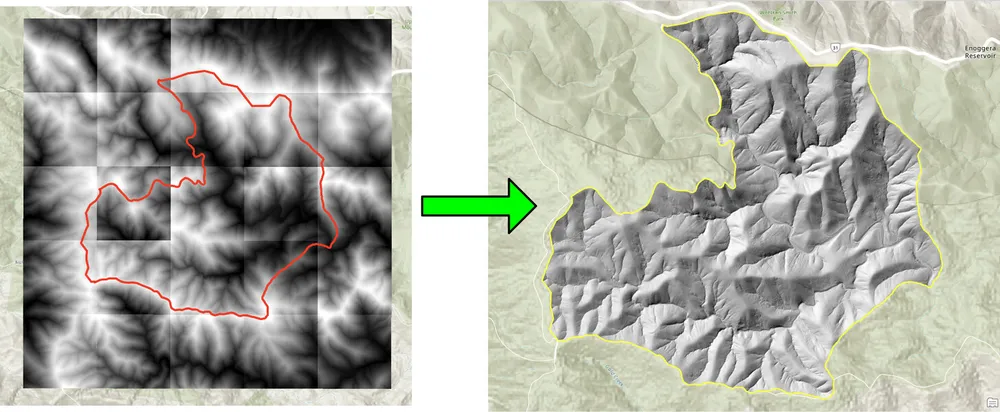
This example shows some of the raster and image-processing tools KDRM has created for automating raster workflows. These tools are useful for tasks such as batch clipping rasters to an area of interest, resampling rasters to a required output resolution, preparing raster inputs for later analysis, and removing slow repetitive manual processing steps from larger delivery workflows.
The examples below focus on open-source Python packages only. In practice, tools like this can be run as standalone scripts, scheduled processing jobs, or embedded inside broader desktop workflows in ArcGIS Pro or QGIS, depending on the client environment and how the workflow needs to be operated.
What these tools are used for
- Batch clipping DEMs, DTMs, and other rasters to an area of interest.
- Resampling rasters to align cell sizes for later calculations and modelling.
- Filtering and validating raster inputs before downstream analysis.
- Automating raster processing steps that would otherwise take hours of manual work.
- Building repeatable raster-processing pipelines that can be run in desktop, server, or command-line environments.
Why we build tools like this
We regularly build custom automation for raster-heavy projects because performance, repeatability, and portability matter. Sometimes the requirement is to run as a pure open-source workflow without an ArcGIS dependency. In other cases the same logic needs to sit inside an ArcGIS Pro or QGIS workflow so analysts can run the process within a familiar desktop environment. The underlying approach is the same: automate the repetitive parts, keep the logic transparent, and make the workflow easier to rerun and support.
The clipping example below was created for a workflow where batch clipping rasters with a traditional desktop approach was too slow. Rewriting the process with open-source Python packages made the workflow dramatically faster and more practical for larger raster collections. The resampling example was built for a similar reason, where large raster datasets needed to be aligned to a finer output cell size so later raster calculations could run at the required resolution.
Example 1. Batch clipping rasters with open-source Python
import json
import numpy as np
import os
import rasterio
import shutil

from rasterio.mask import mask
from shapely.geometry import shape
# the input and output directories for the rasters
input_directory = "input"
output_directory = "output"

# delete and recreate the output directory
if(os.path.exists(output_directory)):
    shutil.rmtree(output_directory)

os.makedirs(output_directory)

feature_collection = dict()

with open('national_park.geojson', 'r') as f:
    feature_collection = json.load(f)
area_of_interest = feature_collection['features'][0]['geometry']
clip_area = shape(area_of_interest)

for file in os.listdir(input_directory):
    # filter by tif files and only files with 2019 in the name
    if file.endswith('.tif') and '2019' in file:
        print(file)

        input_raster = os.path.join(input_directory, file)
        output_raster=os.path.join(output_directory, file)
        with rasterio.open(input_raster) as src:
            try:
                out_image, out_transform = mask(src, [clip_area], crop=True)

                # Set all nodata values to -99999
                out_image[out_image == src.nodata] = -99999
                raster_intersected = not np.all(out_image == -99999)
                # Check if the clip area intersects the raster and only save the raster if the clip area intersects with it
                if raster_intersected:
                    out_meta = src.meta.copy()
                    out_meta.update(
                        {
                            "driver": "GTiff",
                            "height": out_image.shape[1],
                            "width": out_image.shape[2],
                            "transform": out_transform,
                        }
                    )
                    with rasterio.open(output_raster, "w", **out_meta) as dest:
                        dest.write(out_image)

            except Exception as err:
                if ('Input shapes do not overlap raster' not in str(err)):
                    print('### Error with {} ###'.format(input_raster))
                    print(err)
                pass
Example 2. Resampling rasters with open-source Python
import os
from osgeo import gdal

import numpy as np
import os

# the input and output directories
input_directory = 'input/DTM'
output_directory = 'output/DTM'

if not os.path.exists(output_directory):
    os.makedirs(output_directory)
for root, dirs, files in os.walk(input_directory):
    for file in files:
        if(file.endswith('.tif')):
            input_file = os.path.join(root, file)
            output_file = os.path.join(output_directory, file)

            print(file)

            # Read the input raster file
            raster = gdal.Open(input_file)
            # Get the original cell size
            cell_size = raster.GetGeoTransform()[1]
            # print('Original cell size: {}'.format(cell_size))

            # Calculate the number of cells for the output
            num_cells = int(np.ceil(cell_size / 0.5))
            # Create the output raster file
            driver = gdal.GetDriverByName('GTiff')
            out_raster = driver.Create(output_file, raster.RasterXSize * num_cells,
                                    raster.RasterYSize * num_cells, 1,
                                    gdal.GDT_Float32)

            # Set the output raster's projection
            out_raster.SetProjection(raster.GetProjection())
            # Set the output raster's geotransform
            out_raster_geo = list(raster.GetGeoTransform())
            out_raster_geo[1] = 0.5
            out_raster_geo[5] = -0.5
            out_raster.SetGeoTransform(out_raster_geo)

            nodata = -99999

            for i in range(1, out_raster.RasterCount + 1):
                # set the nodata value of the band
                out_raster.GetRasterBand(i).SetNoDataValue(nodata)
            # Copy the input raster data to the output raster
            gdal.ReprojectImage(raster, out_raster,
                                raster.GetProjection(),
                                out_raster.GetProjection(),
                                gdal.GRA_NearestNeighbour)

            # Close the files
            out_raster = None
            raster = None
Delivery options
The examples above are deliberately simple, but the same approach can be extended for larger production workflows with logging, validation, parallel processing, metadata checks, packaging, and integration into wider GIS delivery pipelines. Depending on the client requirement, we can provide these tools as standalone scripts, desktop-integrated tools for ArcGIS Pro or QGIS, or productionised services as part of a broader spatial data platform.